What is

primary anatomic total shoulder replacement?

Anatomic total shoulder

Primary shoulder replacement refers to the first shoulder replacement procedure performed on a patient. It does not describe the type of implant used but rather indicates that the shoulder has not previously undergone a replacement procedure. One option for a primary procedure is primary anatomic total shoulder replacement. Orthopaedic surgeons perform a primary anatomic total shoulder arthroplasty (TSA) to treat severe shoulder pain and lack of motion. During an anatomic TSA surgery, the surgeon replaces diseased and injured joint components with medical-grade implants designed to appear similar to our normal, healthy shoulder joint. The four important soft tissue stabilizers of the shoulder (often referred to as the rotator cuff) must be functioning well to support the anatomic TSA procedure. 

Stryker offers a comprehensive portfolio of anatomic shoulder replacement solutions, designed to help restore the shoulder’s natural anatomy and support individualized patient care. Led by the Tornier Perform Anatomic Shoulder System, this versatile platform offers multiple implant options—including stemmed and stemless designs—to help surgeons address a wide range of patient anatomies and surgical preferences. These anatomic solutions are designed for use with Stryker’s Blueprint 3D planning software, which allows your orthopedic surgeon to create a personalized, pre‑operative plan and, when appropriate, utilize optional patient‑specific instrumentation (PSI) prior to surgery. For patients who may benefit from a bone‑preserving approach, Tornier Simpliciti, Stryker’s stemless anatomic shoulder system, provides an additional option designed to preserve bone while supporting future flexibility. Together, Stryker’s anatomic shoulder solutions and digital planning technologies help surgeons plan and perform shoulder replacement tailored to each patient’s unique anatomy. 
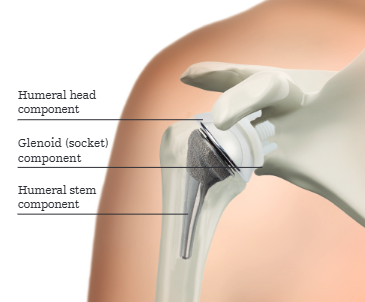
What happens during the actual procedure?

During a primary anatomic total shoulder replacement, the ball (humeral head) of the shoulder joint is replaced with an implant that includes a stem with a smooth, rounded metal head.1 The socket (glenoid) is fitted with a smooth, rounded plastic cup that fits the head of the ball. Primary Anatomic total shoulder replacement is intended to mimic the natural ball and socket anatomy of the shoulder joint and may be recommended by a doctor for patients with advanced arthritis of the shoulder joint and an intact rotator cuff. 


Reference:
  1. Shoulder Replacement brochure https://view.stryker.com/viewer/bd1012e501fdbc28790f488d441ecef5

Shoulder replacement

Anatomic total shoulder joint replacement is intended for use in individuals with painful, disabling joint disease of the shoulder resulting from: degenerative arthritis, rheumatoid arthritis or post-traumatic arthritis. Additional indications could include but not limited to: aseptic necrosis of the humeral head, proximal humeral fracture and revision of previous unsuccessful hemiarthroplasty or other procedures.

Reverse total shoulder joint replacement is intended for use in individuals with a functional deltoid muscle and with massive and non-repairable rotator cuff tear with pain disabled by: rheumatoid arthritis, non-inflammatory degenerative joint disease, humeral head fracture, traumatic arthritis and revision of devices if adequate bone stock remains.

Shoulder joint replacement surgery is not appropriate for patients with any active or suspected latent infection in or about the shoulder joint, any mental or neuromuscular disorder which would create an unacceptable risk of prosthesis in stability, prosthesis fixation failure or complications in postoperative care. Additionally, shoulder joint replacement surgery is not appropriate for patients whose anticipated activities would impose high stresses on the prosthesis and its fixation.

As with any surgery, shoulder joint replacement surgery has serious risks which include, but are not limited to, pain, infection, intraoperative complications, component wear, nerve damage, loosening of shoulder components and dislocation of the shoulder prosthesis.

Implant related risks which may lead to a revision or removal of the implant include being overweight, manual labor activities, some sports activities, patient age, activity level, medical conditions, alcohol or drug addiction, and mental disorders. Shoulder joint implants may not provide the same feel or performance characteristics experienced with a normal healthy joint

The information presented is for educational purposes only. Speak to your doctor to decide if joint replacement surgery is appropriate for you. Individual results vary and not all patients will return to the same activity level. The lifetime of any joint replacement is limited and depends on several factors like patient weight and activity level. Your doctor will counsel you about strategies to potentially prolong the lifetime of the device, including avoiding high-impact activities, as well as maintaining a healthy weight. It is important to closely follow your doctor’s instructions regarding post-surgery activity, treatment, and follow-up care. Ask your doctor if a joint replacement is right for you.

This site is for visitors from the United States.

Stryker Corporation or its divisions or other corporate affiliated entities own, use or have applied for the following trademarks or service marks: Blueprint, ReUnion, Simpliciti, Shoulder iD, Stryker, Tornier. All other trademarks are trademarks of their respective owners or holders.

Copyright © 2024 Stryker


OT-AWI-53 Oct-2023

Please upgrade your internet browser.

Our website was designed for a range of browsers. However, if you would like to use many of our latest and greatest features, please upgrade to a modern, fully supported browser.

Find the latest versions of modern supported browsers »

Note: If you are browsing in Internet Explorer 9 or later, and you are still seeing this message, you may be in Compatability Mode. Look for the Compability View icon in your Address bar, or the Compatability View and Compatability View settings from the Tools Menu in your Internet Explorer toolbar (hit the ALT key if your menu bar is hidden). If you are on an Intranet, you may need to contact your IT Support about Compatability View settings and whitelists.